Template
Sauda Book — Deals Booked vs Delivered
A sauda is booked in a phone call — so many quintals at a rate, to be delivered by a date — and then delivered a lorry at a time. Somewhere between the two it is easy to lose track of what is still owed on each deal, which ones are late, and which have already been over-supplied. This book keeps one row per deal and one row per lorry or lot delivered against it, for both sides of the trade, and works out pending quantity and value, overdue deals and over-deliveries by itself.
₹999 on Gumroad · Google Sheets (your own copy) · Filled example · Quick Start Guide (PDF) · Delivered by email — see what’s inside below.
What it does
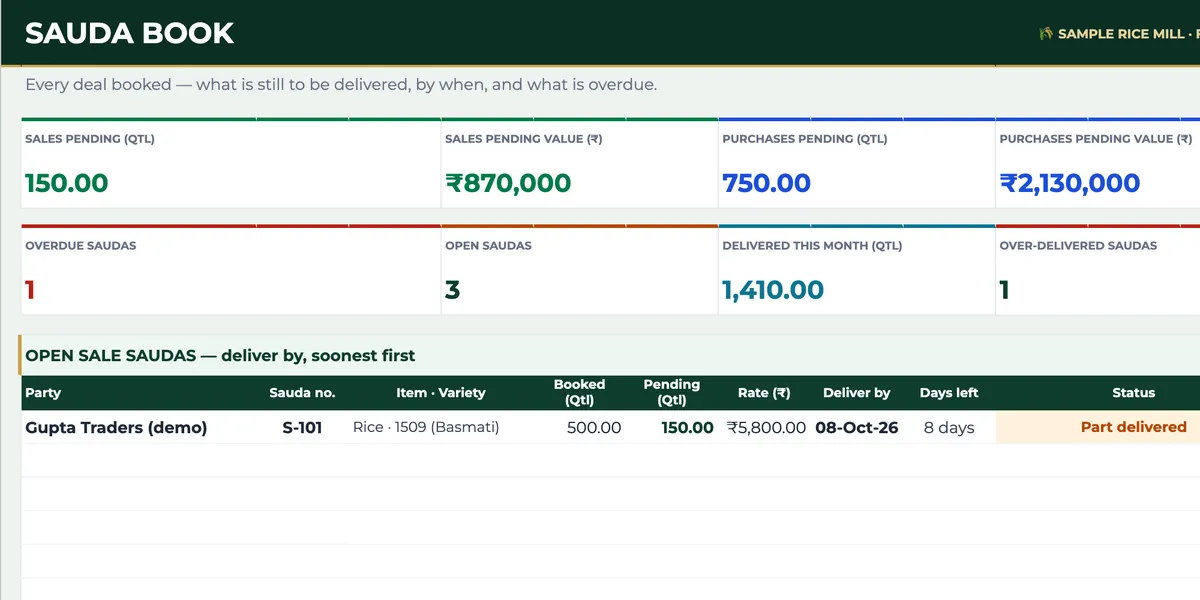
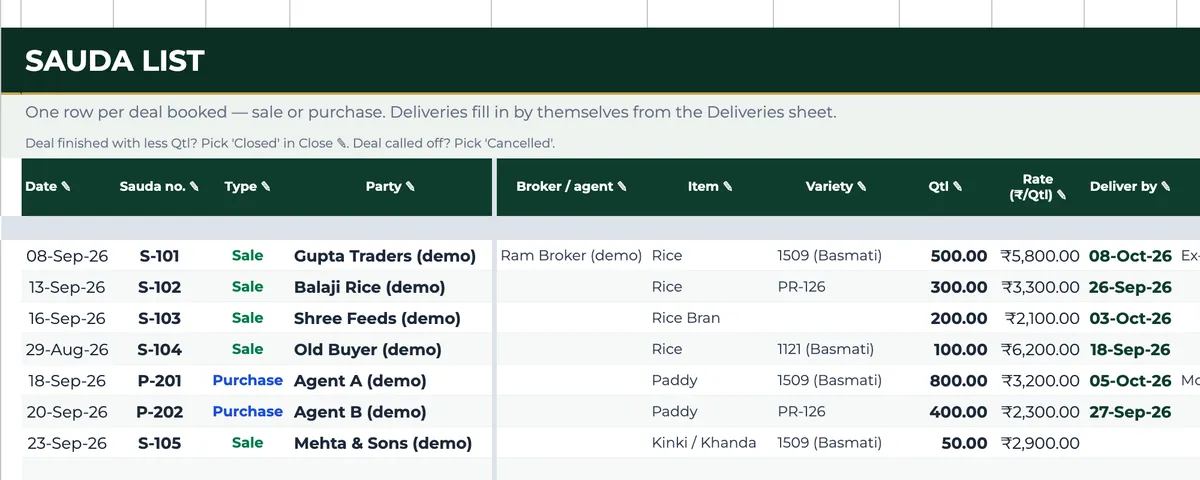
Sauda List takes one row per deal booked: date, sauda number, sale or purchase, party, broker or agent, item, variety, quantity, rate, deliver-by date and a note for terms such as credit days or a moisture limit. Deliveries takes one row per lorry or lot: pick the sauda number, type the quantity, date and truck or bill, and the party, item and type fill in from the deal. Each deal then shows its value, quantity delivered, quantity pending and a status — part delivered, done, overdue, over-delivered, closed short or cancelled — and a delivery typed against a sauda number that does not exist is flagged. The Saudas tab puts it together: quintals and value pending on sales and on purchases, overdue and over-delivered deals, deliveries this month, open sale and purchase saudas sorted by deliver-by date with the days left, and what is pending item by item across paddy, rice and every by-product. A deal that ends with less than booked can be closed short, and a deal called off can be cancelled, from its own row.
Who it’s for
- Rice mills and grain traders who book sale and purchase saudas through brokers.
- Sales and purchase in-charges who answer “how much is still pending on my deal?”
- Owners who want late and over-supplied deals caught before the party calls.
Fields included
How to use it
- In Setup, list your varieties for the dropdown.
- Add each deal in Sauda List as it is booked: sale or purchase, party, broker, item, variety, quantity, rate and deliver-by date.
- Add each lorry or lot in Deliveries against its sauda number, with quantity, date and truck or bill.
- Close a deal short or cancel it from its row in Sauda List when that is how it ends.
- Check the Saudas tab daily: pending by deal and by item, and anything overdue or over-delivered.
Preview
₹999
Get it on Gumroad ↗Google Sheets (your own copy) · Filled example · Quick Start Guide (PDF) · Delivered by email
Sold by Jay Sudha. Checkout and delivery by Gumroad.
Example workflow
The EXAMPLE file holds a sample mill’s saudas for September 2026. Sauda S-101 sold 500 quintals of 1509 Basmati rice at ₹5,800 to be delivered by 8 October; two lorries have taken 350 quintals, so 150 quintals worth ₹8,70,000 are still pending against that date. On the purchase side, P-202 booked 400 quintals of PR-126 paddy from an agent for delivery by 27 September; only 100 quintals have come, so once the date passed the deal shows as overdue. S-103 booked 200 quintals of rice bran and 220 went, so it is flagged as over-delivered; S-104 was closed short at 80 of 100 quintals and S-105 was cancelled, and neither counts as pending any more. One delivery was typed against a sauda number that does not exist, and the file says so on that row.
Frequently Asked Questions
Reviews
No reviews yet.
Bought this template? Review it
I read every review and publish it here, with the name you give, once I have matched your email to a Gumroad purchase. Your email is never shown. Privacy Policy