Template
Capital Gains & XIRR Portfolio Tracker
Each broker and each fund house sends its own capital-gains statement, and none of them knows about the others. When the same share was bought through two brokers, or a SIP’s units were redeemed from several instalments at once, the short-term and long-term split has to be worked out lot by lot, oldest first, before anything can go into a return. This tracker takes every transaction from every broker and folio, matches each sale against its purchase lots in FIFO order, sorts the gains by the section they fall under, and also answers the question the tax statement never does: what the portfolio has actually returned, as XIRR, against a benchmark on the same cash flows.
₹1,499 on Gumroad · Google Sheets (your own copy) · Filled example · Quick Start Guide (PDF) · Delivered by email — see what’s inside below.
What it does
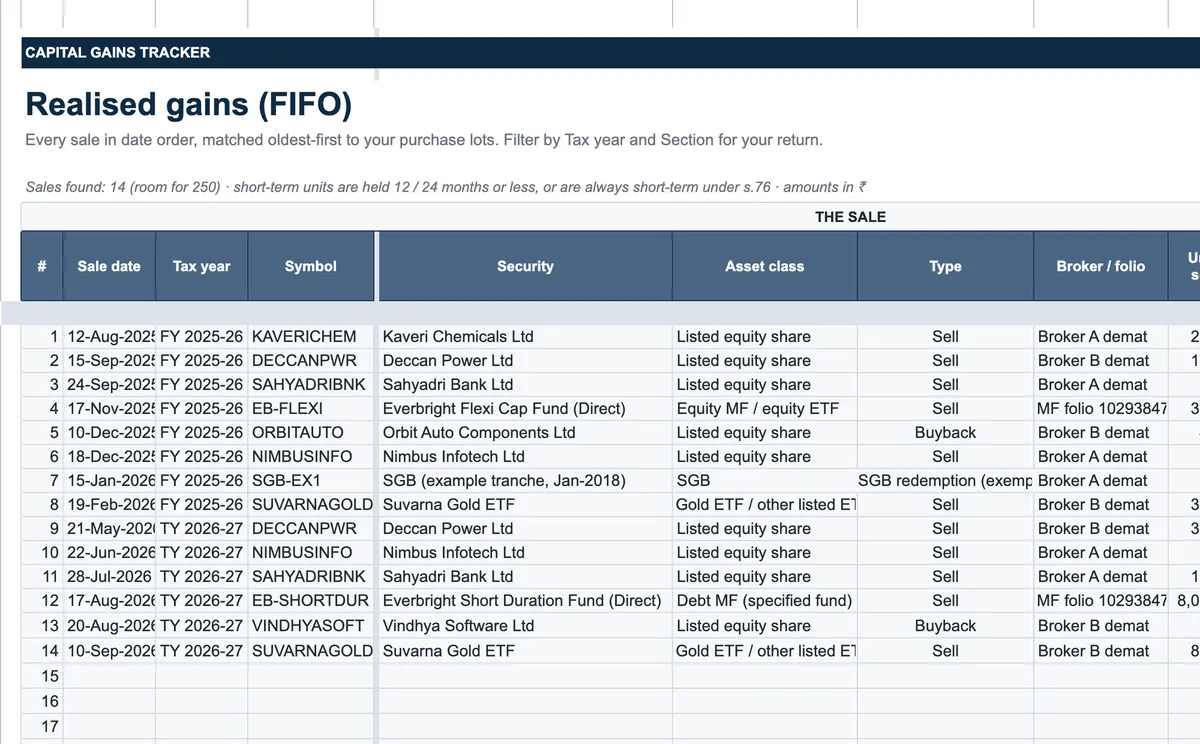
Setup holds your name, residential status, slab rate, the price date, the FIFO option and losses brought forward. Securities lists each share, fund, ETF, bond or gold bond with its asset class, current price and, for older equity, its value on 31 January 2018. Transactions takes every buy, sell, buyback, dividend and redemption from all brokers and folios, in any order, and a FIFO engine alongside splits each sale across the lots it came from. Realised Gains shows every sale matched to its lots with the short- and long-term split, grandfathering, section and tax year; Holdings shows what is held now at FIFO cost, the gain if sold today and when short-term lots turn long-term. Capital Gains Schedule totals the tax year by section — short-term equity, long-term equity with the ₹1,25,000 exemption, other long-term gains and slab-rate gains — with set-off, carry-forward and an estimated tax, in the order your CA or the return utility needs it. Tax Harvesting shows how much of the exemption is unused and which holdings could use it, labelled as an idea rather than advice; the Dashboard adds wait-to-sell alerts for lots about to turn long-term. XIRR works out the annualised return of each holding and of the portfolio, and compares it with a benchmark index you enter using the same dates and amounts. Rules and Sources list every holding period, rate and rule with the official document behind it.
Who it’s for
- Resident investors with shares and mutual funds spread over two or more brokers or folios.
- SIP investors who want to know which units are long-term before redeeming.
- Anyone who wants to check a broker’s capital-gains report before filing the return.
Fields included
How to use it
- In Setup, type your name, residential status, slab rate, the price date and any losses brought forward.
- List each security in Securities with its asset class and current price, and the 31 January 2018 value for older equity.
- Paste every transaction from each broker’s tradebook and each fund statement into Transactions — date, symbol, type, quantity, price, charges — in any order.
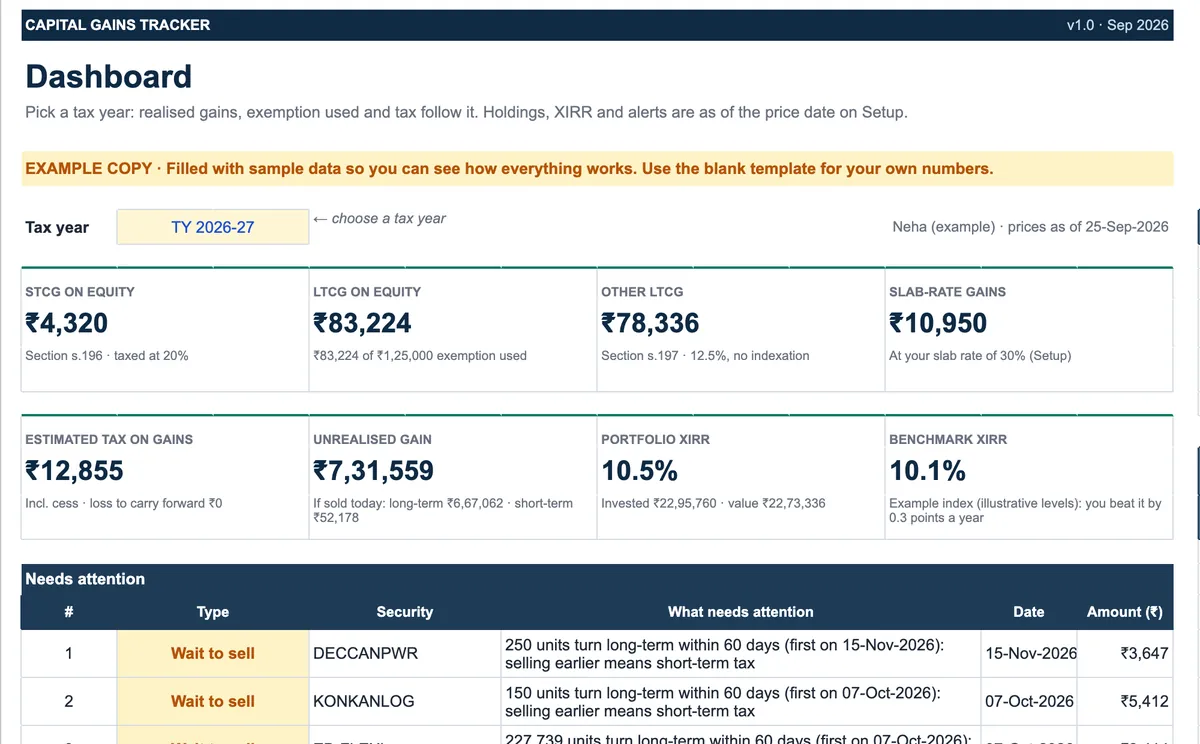
- Pick a tax year on the Dashboard: realised gains by section, exemption used, estimated tax, unrealised gains and XIRR.
- Check the wait-to-sell alerts and Tax Harvesting before selling, then hand the Capital Gains Schedule to your CA.
Preview
₹1,499
Get it on Gumroad ↗Google Sheets (your own copy) · Filled example · Quick Start Guide (PDF) · Delivered by email
Sold by Jay Sudha. Checkout and delivery by Gumroad.
Example workflow
The EXAMPLE file is a fictional investor’s portfolio, priced as of 25 September 2026, with 14 sales across tax years 2025-26 and 2026-27. For tax year 2026-27 it shows ₹4,320 of short-term equity gains, ₹83,224 of long-term equity gains — inside the ₹1,25,000 exemption — ₹78,336 of other long-term gains and ₹10,950 of gains taxed at the 30% slab, for an estimated tax of ₹12,855. Three alerts say to wait before selling: in one share, 250 units start turning long-term from 15 November 2026, and selling them earlier would make the gain short-term. Tax Harvesting notes that ₹41,776 of the exemption is still unused while ₹6,67,062 of long-term equity gains sit in the portfolio, and lists the holdings that could use it — as an idea to discuss, not a recommendation. The portfolio’s XIRR is 10.5% against 10.1% for the example benchmark on the same cash flows.
Frequently Asked Questions
Reviews
No reviews yet.
Bought this template? Review it
I read every review and publish it here, with the name you give, once I have matched your email to a Gumroad purchase. Your email is never shown. Privacy Policy