Template
Rice Bran Sales Register
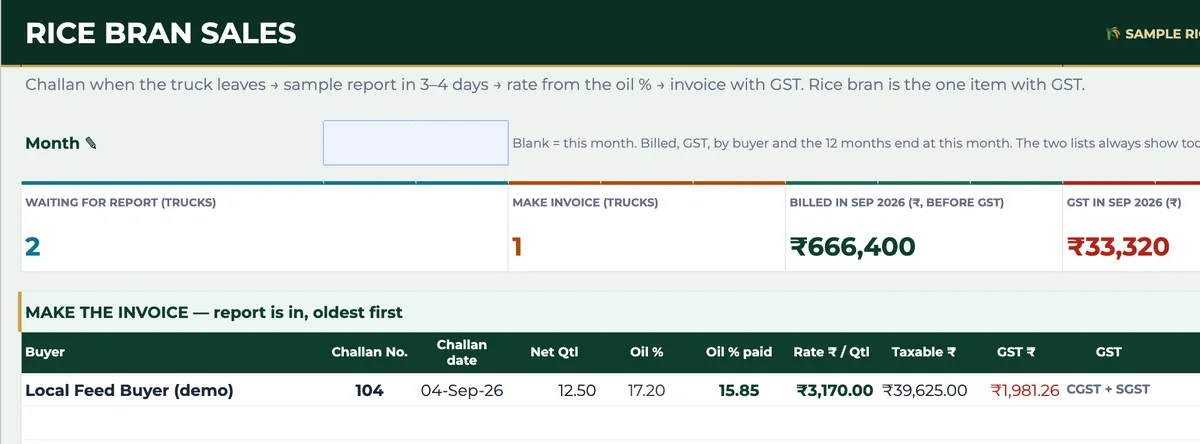
Rice bran is sold before its price is known. The truck leaves on a challan, the buyer’s lab reports the oil content a few days later, and only then can the rate — and the invoice — be made: the report’s oil % less a deduction, compared with a basis, with your agreed share of anything above it and of anything below it, times the rate per 1% of oil fixed on the challan date. This register carries each truck through those steps, works out the rate and the GST, and keeps two lists in front of you: trucks still waiting for a report and invoices ready to be made.
₹1,499 on Gumroad · Google Sheets (your own copy) · Filled example · Quick Start Guide (PDF) · Delivered by email — see what’s inside below.
What it does
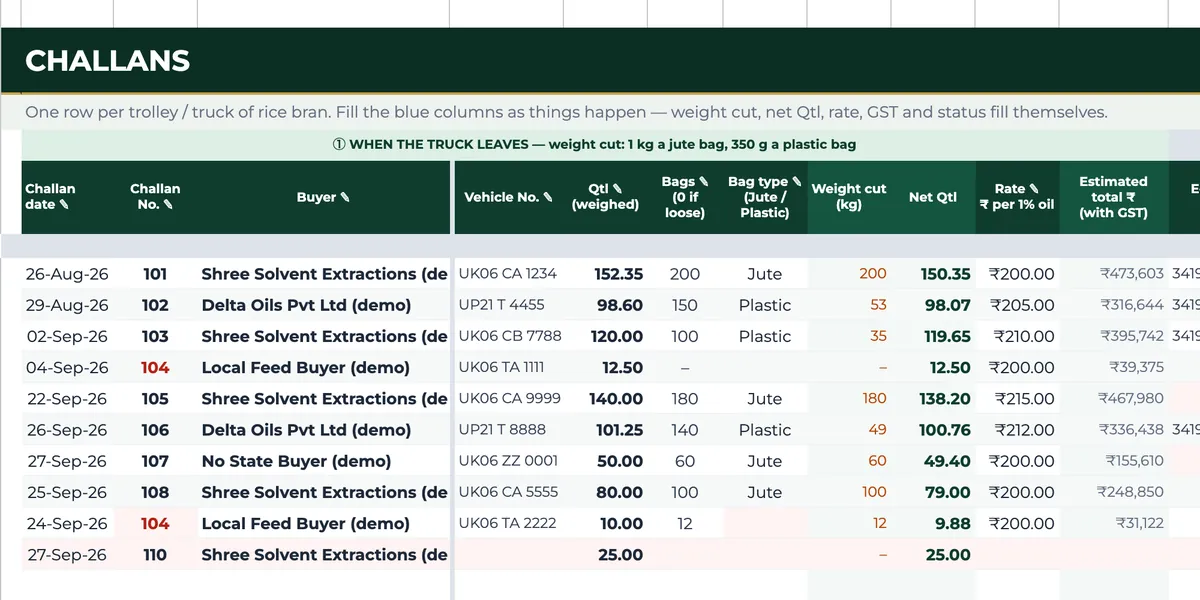
Setup is filled once: your own state, the GST rate, the rate terms (deduction, basis oil %, the share you get above the basis and the share you bear below it), your bag cuts per jute and plastic bag, and your rice bran buyers with their GSTINs. Terms are dated, so a change applies from its date and earlier trucks keep the terms they were sold on. Challans takes one row per truck or trolley: challan date and number, buyer, vehicle, quantity weighed, bags and bag type, the rate per 1% of oil and the e-way bill; the weight cut, net quintals and an estimate at your expected oil % fill in at once, and when the report arrives you type its oil % and the invoice details. The Rice Bran tab then shows trucks waiting for a report and invoices to make, oldest first, finds any challan with its full working from report oil % to invoice total, offers a quick rate check for a quoted oil % before a deal, and totals the month for your GST return — taxable value for buyers inside and outside your state, CGST, SGST and IGST — with sales by buyer and the last twelve months. CGST plus SGST or IGST is chosen from the first two digits of the buyer’s GSTIN against your state.
Who it’s for
- Rice mills selling bran to solvent-extraction plants and feed buyers on oil-content terms.
- Accounts staff who make the GST invoice once the report is in.
- Owners who want to check that the rate a report gives matches the terms agreed.
Fields included
How to use it
- In Setup, set your state, the GST rate, the dated rate terms, the bag cuts and your buyers with their GSTINs.
- When a truck leaves, add a row in Challans: date, challan number, buyer, vehicle, quantity, bags, bag type and the rate per 1% of oil.
- When the report comes, type the oil %; the counted oil %, oil % paid, rate per quintal, taxable value and GST follow.
- Make the invoices listed on the Rice Bran tab, oldest first, and type the invoice number and date against the challan.
- At month end, take the GST totals for the month from the Rice Bran tab to your return.
Preview
₹1,499
Get it on Gumroad ↗Google Sheets (your own copy) · Filled example · Quick Start Guide (PDF) · Delivered by email
Sold by Jay Sudha. Checkout and delivery by Gumroad.
Example workflow
Challan 101 in the EXAMPLE file left on 26 August 2026: 152.35 quintals in 200 jute bags, sold at ₹200 per 1% of oil. The 1 kg bag cut takes it to 150.35 quintals, and at the expected 15% oil the estimate is ₹3,000 a quintal. The report came back at 18.90%. On the example terms — deduct 0.50, basis 15.00, half of anything above the basis to the seller — the counted oil is 18.40%, the 3.40 points above basis count at 50%, and 16.70% is paid: ₹3,340 a quintal, a taxable value of ₹5,02,169 against the ₹4,51,050 estimated on dispatch. The buyer is in the same state, so CGST and SGST are charged at the rate set in Setup (5% in the example, an editable setting to confirm for your own case), and the invoice total is ₹5,27,277.46. Meanwhile two later trucks are still waiting for their reports, one of them for eight days.
Frequently Asked Questions
Reviews
No reviews yet.
Bought this template? Review it
I read every review and publish it here, with the name you give, once I have matched your email to a Gumroad purchase. Your email is never shown. Privacy Policy