Template
Coaching Institute Fee & Batch Manager
A coaching centre’s fee problem is rarely the fee itself; it is the instalments. Each student has a different plan and discount, some join mid-course, a few leave, and on any given morning somebody has to know which parents to remind. This workbook builds every student’s instalment schedule from the fee plan, applies payments to the oldest instalment first, and turns the result into a due list with a reminder link per parent — alongside batch occupancy, teacher payouts and the refunds owed to students who leave.
₹1,999 on Gumroad · Google Sheets (your own copy) · Filled example · Quick Start Guide (PDF) · Delivered by email — see what’s inside below.
What it does
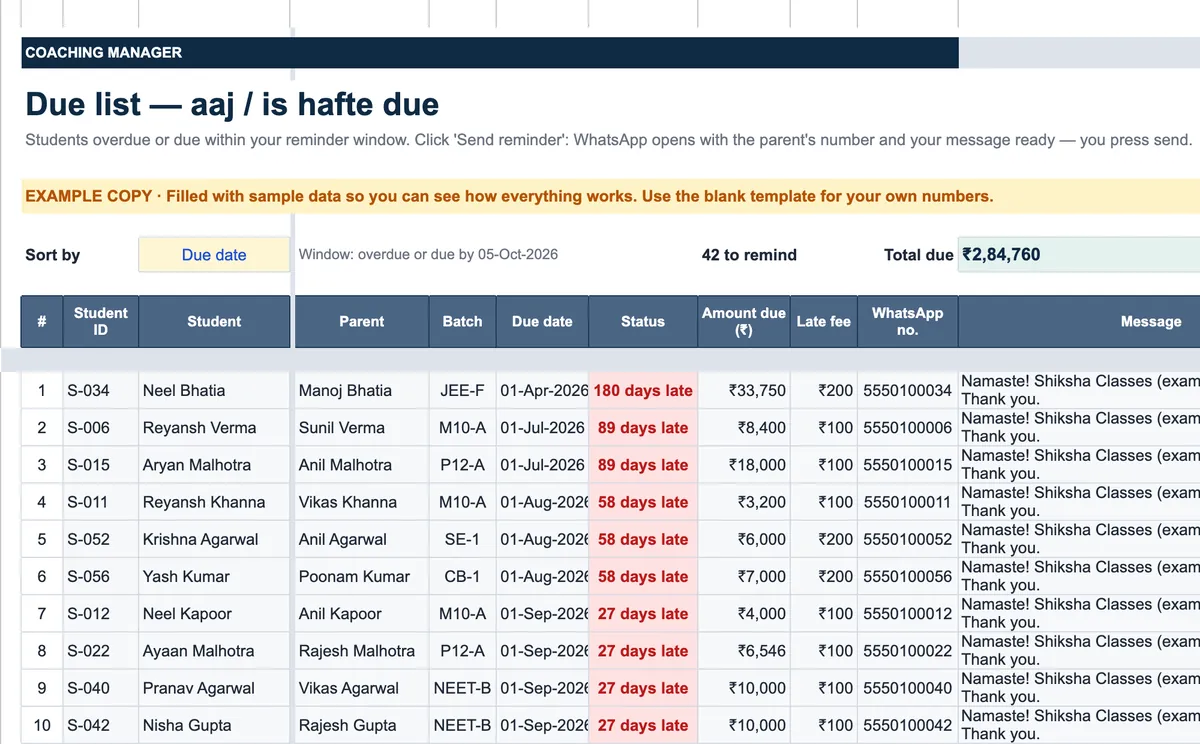
Setup holds the institute’s details, GST registration, academic year, receipt prefix, the reminder message, the refund rule and the teachers. Batches lists each batch with course, teacher, timing, capacity, fee, dates and room, and shows occupancy against capacity. Students takes each student’s parent WhatsApp number, batch, fee, discount, fee plan — one-time, monthly, quarterly or a custom number of instalments up to twelve — status and leaving date. Fee Schedule then builds every student’s instalments with due dates and marks what is still due and what is overdue; Receipts records payments with automatic receipt numbers and, for a registered institute, the split of taxable value and GST, applied to the oldest instalment first. Due List shows students overdue or due within your reminder window, sorted as you choose, each with a link that opens WhatsApp with the parent’s number and your message ready — you press send. Teacher Payout works out each teacher’s monthly pay by their model: per student, per hour, fixed monthly or a percentage of batch collection. Refunds calculates a pro-rata refund for a student who leaves, by the method the Ministry of Education’s 2024 guidelines for coaching centres describe, with the date it falls due; Reports shows collection against target, occupancy and fee lost to dropouts; Fee Statement prints any student’s instalments, receipts and balance.
Who it’s for
- Tuition and coaching centres with one to ten teachers and up to 250 students.
- Home tutors and small academies moving from a fee notebook to something that reminds them.
- Spoken English, computer and hobby classes that take fees in instalments.
Fields included
How to use it
- In Setup, type the institute details, GST status, academic year, receipt prefix, reminder message and refund rule, and list your teachers.
- Add each batch in Batches with its fee and capacity, then each student in Students with fee plan and discount.
- Record every payment in Receipts; it is applied to the student’s oldest instalment.
- Open Due List each morning and send the reminders it lists.
- At month end, read the Dashboard and Reports, and settle teachers from Teacher Payout.
- When a student leaves, type the leaving date; Refunds works out what is owed back.
Preview
₹1,999
Get it on Gumroad ↗Google Sheets (your own copy) · Filled example · Quick Start Guide (PDF) · Delivered by email
Sold by Jay Sudha. Checkout and delivery by Gumroad.
Example workflow
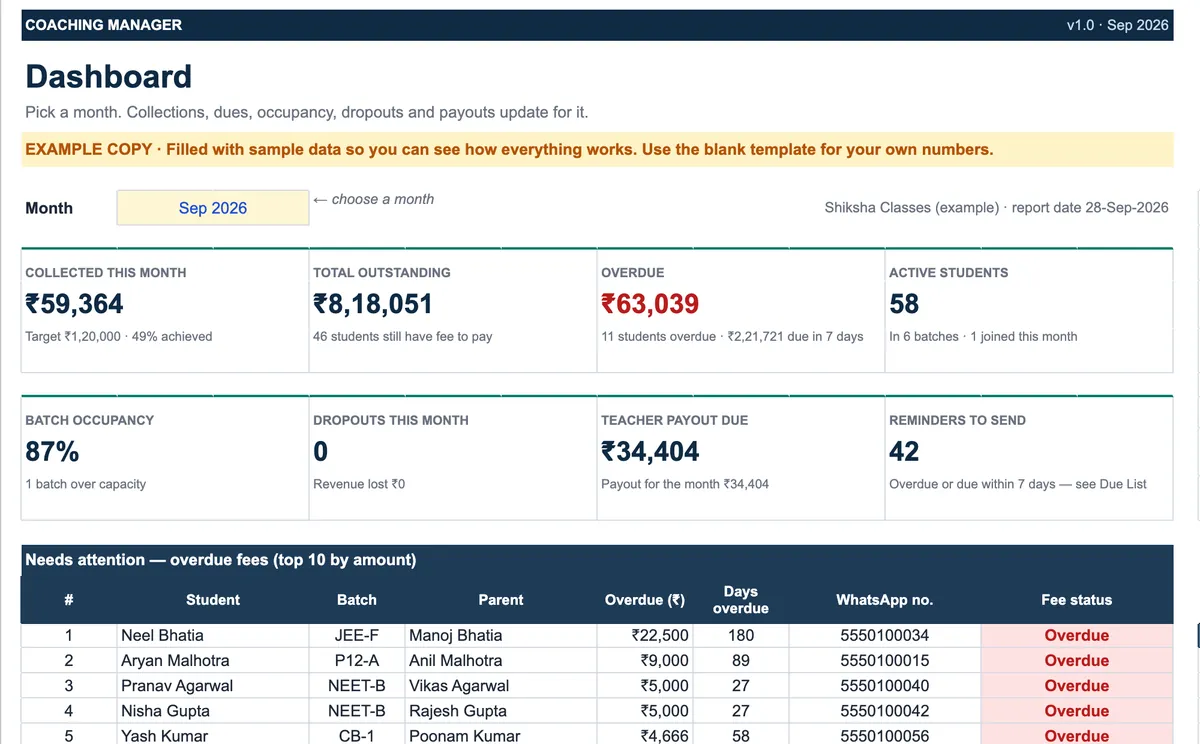
The EXAMPLE file is a fictional institute with 58 active students in six batches, at the end of September 2026. The month’s collection target was ₹1,20,000 and ₹59,364 has come in — 49% — while ₹8,18,051 is outstanding across 46 students, of which ₹63,039 is already overdue from eleven students and ₹2,21,721 falls due within the week. The Due List has 42 reminders ready, starting with a student whose instalment is 180 days late. One batch holds 11 students against a capacity of 10, which the occupancy check flags, and the teachers’ payout for the month comes to ₹34,404. None of this needed anyone to add up a fee register: the schedules came from each student’s fee plan, and every receipt went to the oldest instalment on its own.
Frequently Asked Questions
Reviews
No reviews yet.
Bought this template? Review it
I read every review and publish it here, with the name you give, once I have matched your email to a Gumroad purchase. Your email is never shown. Privacy Policy