Template
Sales Ledger (Agent / Broker-wise)
Rice sold through a broker is rarely paid for in one go, and the amount due is not simply quantity × rate. Some buyers take a weight cut in grams per quintal, some deduct a bag cut depending on whether the rice went in jute or plastic, cash discount comes off, and the broker’s aarhat is owed on top. This ledger keeps one file per broker and one row per item sold, applies each deduction only where it was agreed, and tracks money received bill by bill, so the balance each buyer owes is always current.
₹1,499 on Gumroad · Google Sheets (your own copy) · Filled example · Quick Start Guide (PDF) · Delivered by email — see what’s inside below.
What it does
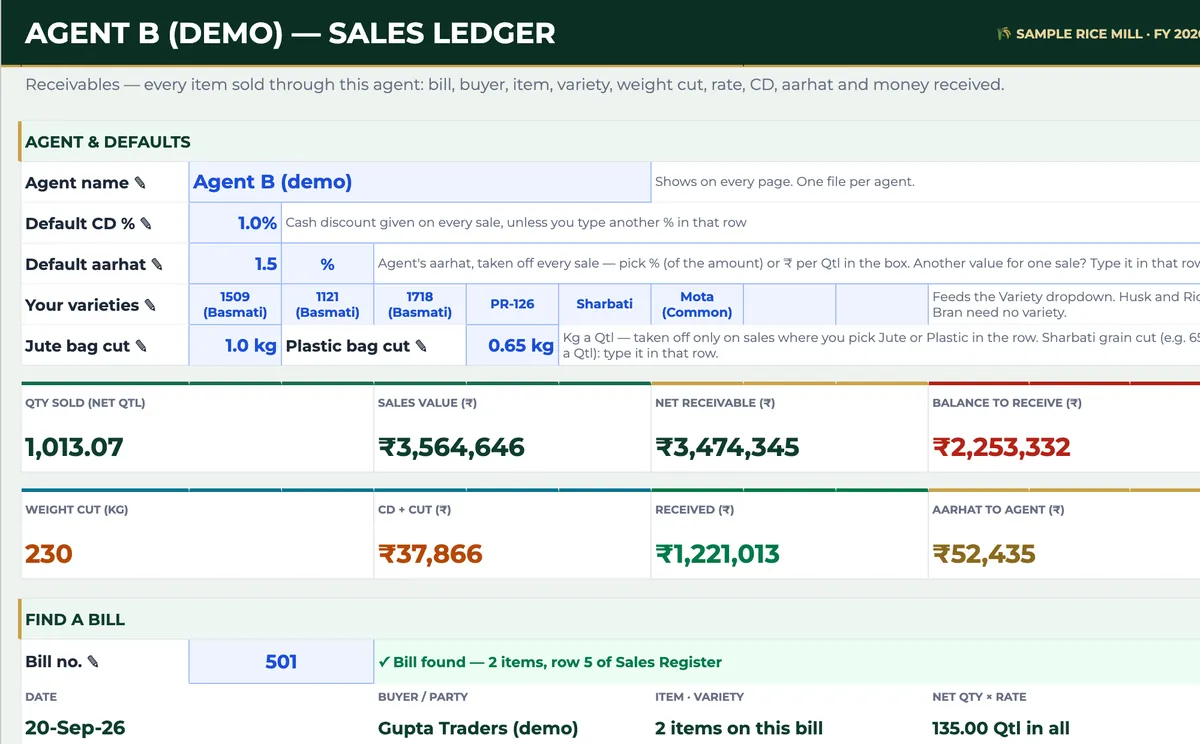
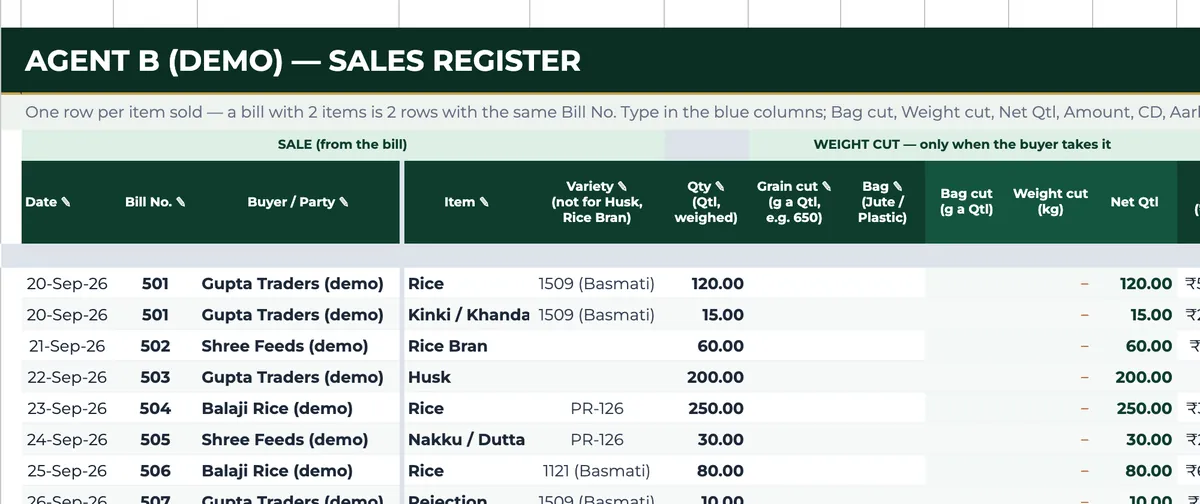
Summary holds the broker’s defaults: the agent’s name, a default CD %, a default aarhat (as a percentage or as rupees per quintal), your varieties, and the bag cut in kilograms per quintal for jute and for plastic. Sales Register takes one row per item sold — a bill with two items is two rows with the same bill number — with date, bill number, buyer, item, variety, quantity and rate, plus a grain cut in grams per quintal and a bag type only when that buyer takes a cut; a blank means no cut. From those it fills the bag cut, weight cut, net quintals, amount, CD, aarhat, net receivable, balance and status, and any row can override the default CD or aarhat. Money received goes against the bill. Summary adds it all up — net quintals sold, sales value, net receivable, received, balance to receive, weight cut, CD plus cut and aarhat to the agent — shows every item sold variety by variety with its value and average rate, finds a bill by number even when it has several items, and lists every buyer with bills, quantity, net receivable, received and balance. Buyer Ledger shows one buyer’s sales and payments.
Who it’s for
- Rice mills selling rice, husk, bran and brokens through brokers or agents.
- Accounts staff chasing receivables buyer by buyer.
- Brokers who keep buyer-wise accounts for the mills they sell for.
Fields included
How to use it
- On Start Here, type the business name and the date your financial year starts.
- In Summary, type the broker’s name, the default CD % and aarhat, your varieties and the jute and plastic bag cuts. Use one copy per broker.
- In Sales Register, add one row per item sold; a two-item bill is two rows with the same bill number.
- Type a grain cut or pick a bag type only on rows where the buyer takes a cut.
- Record money received against each bill; balance and status update.
- Use Summary for totals and who owes what, Find a bill for any bill number, and Buyer Ledger for one buyer’s account.
Preview
₹1,499
Get it on Gumroad ↗Google Sheets (your own copy) · Filled example · Quick Start Guide (PDF) · Delivered by email
Sold by Jay Sudha. Checkout and delivery by Gumroad.
Example workflow
The EXAMPLE file is one demo broker’s sales for a sample mill in late September 2026, on 1% CD and 1.5% aarhat, with bag cuts of 1 kg a quintal for jute and 650 g for plastic. On 28 September one buyer took 50.37 quintals of PR-126 rice with a 650 g grain cut and a plastic-bag cut; 65 kg comes off and the bill is made on 49.72 quintals. Across all bills the broker has sold 1,013.07 net quintals worth ₹35,64,646; after CD and cuts of ₹37,866 and the broker’s aarhat of ₹52,435, the net receivable is ₹34,74,345, of which ₹12,21,013 has come in, leaving ₹22,53,332 to collect. The buyer list shows where the money sits: one demo buyer owes ₹11,92,333 after paying ₹5,00,000, and another has paid nothing on ₹3,57,334.
Frequently Asked Questions
Reviews
No reviews yet.
Bought this template? Review it
I read every review and publish it here, with the name you give, once I have matched your email to a Gumroad purchase. Your email is never shown. Privacy Policy