Form 26AS and AIS: Your Tax Credit Statement Explained
Form 26AS shows tax deducted on your behalf; the AIS shows your full financial activity reported to the department. Reconcile both before filing ITR.
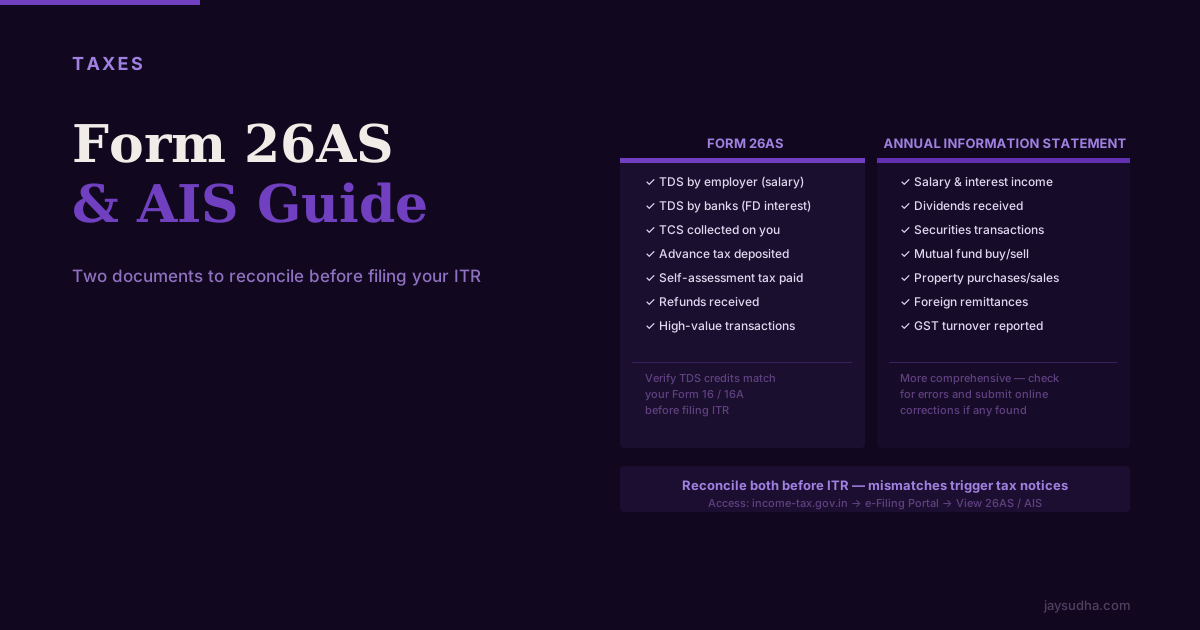
Before filing your Income Tax Return, two documents should be your first reference: Form 26AS and the Annual Information Statement (AIS). Between them, they tell you exactly what the Income Tax Department already knows about your taxes and financial activity — and reconciling this information before you file prevents mismatches that trigger notices.
What Is Form 26AS
Form 26AS is your tax credit statement. It's a document maintained by the Income Tax Department that consolidates all taxes paid against your PAN from every source.
Think of it as the IT Department's record of your tax payments. When you file your return, the amounts you claim must match what's in 26AS — otherwise the system flags a mismatch and you'll receive a notice.
What Form 26AS contains:
Part A — TDS (Tax Deducted at Source): All TDS deducted and deposited against your PAN. This includes:
- TDS on salary (deducted by employer)
- TDS on interest income from bank FDs
- TDS on rental income received (if your tenant is a company or HUF)
- TDS on professional fees or consulting income
- TDS on EPF withdrawal (if applicable)
- TDS on dividend (if dividend from a company exceeds ₹10,000 in the year)
Part B — TCS (Tax Collected at Source): Tax collected by sellers on certain purchases — for example, TCS on purchase of a vehicle above ₹10 lakh, or TCS collected on foreign remittances under LRS.
Part C — Tax Paid by Assessee: Self-assessment tax and advance tax payments you've made directly via Challan 280.
Part D — Refund Issued: Any income tax refunds issued to you in the selected year, with the assessment year they relate to.
Part F — TDS on Sale of Immovable Property: If you've bought immovable property and deducted TDS under Section 194-IA before paying the seller, this appears here.
What Is the Annual Information Statement (AIS)
The AIS is a comprehensive financial information statement launched by the Income Tax Department in 2021. It goes far beyond what Form 26AS captures.
While 26AS focuses primarily on taxes paid, AIS tracks your financial activity across the economy as reported by multiple agencies — not just your employer and your bank.
Who reports data to AIS:
- Banks (account interest, FD interest, savings interest)
- Mutual fund houses (purchases and redemptions)
- Registrars and Sub-Registrars (property transactions)
- Stock exchanges (equity purchases and sales)
- Depository participants (CDSL, NSDL — securities transactions)
- SEBI-registered entities
- Insurance companies (premiums paid above thresholds)
- Foreign Remittance companies (LRS transactions)
- Post offices
- RBI (government securities)
What AIS typically shows:
- Interest income from savings accounts and FDs (from banks)
- Dividend income received
- All mutual fund transactions (both purchases and redemptions) — amounts, dates, and fund names
- Equity share transactions (buys and sells through demat)
- Property sale or purchase (from Sub-Registrar offices)
- Foreign remittances sent or received
- GST turnover (if you're GST-registered, your turnover reported to GSTN flows to AIS)
- Salary and other TDS-deducted income
- Rent received (if reported by the payer)
The purpose of AIS: The Income Tax Department wants you to reconcile the AIS before filing. If AIS shows income that you haven't declared in your ITR, the system will raise discrepancies. If your return matches AIS, the ITR processing tends to be smoother.
The Taxpayer Information Summary (TIS)
Alongside AIS, the income tax portal shows a TIS — Taxpayer Information Summary — which is an aggregated version showing category-level totals rather than individual transactions. It's useful as a quick check of the key income heads.
How to Access Both
Both are accessed through the Income Tax e-filing portal (incometax.gov.in):
For Form 26AS:
- Log in to incometax.gov.in
- Under 'My Account' or 'e-File', navigate to 'View Form 26AS'
- Redirects to TRACES (TDS Reconciliation Analysis and Correction Enabling System)
- Download as PDF or view online by Assessment Year
For AIS:
- Log in to incometax.gov.in
- Go to 'Annual Information Statement (AIS)' under the 'Services' menu
- Download or view the AIS — it's available as a PDF and in JSON format
- The TIS is available on the same page
Reconciling Before You File: A Step-by-Step
This reconciliation takes an hour the first time but is critical:
Step 1: Download your Form 16 (for salary TDS) from your employer
Your employer should provide Form 16 — Part A and Part B — by June 15. Part A shows TDS deducted. Part B shows the detailed salary breakup and deductions they claimed. For a complete three-way comparison of Form 16 against both of the documents below, see Form 16 vs AIS vs Form 26AS.
Step 2: Open Form 26AS and check Part A
Match the TDS shown by your employer in Form 16 Part A with the TDS shown in Form 26AS. The amounts should match. If they don't:
- Your employer may not have deposited the TDS they deducted
- The employer may have made an error in their TDS return
- You may have changed employer mid-year and both records need to appear
Step 3: Check all other TDS entries in Form 26AS
- Bank FD interest: Does the TDS match your FD records?
- Professional income or freelancing: Have all clients deducted TDS correctly?
- Rent: If you received rental income and the tenant (company) deducted TDS, confirm it's here
Step 4: Open AIS and review each section
Go through the income sections:
- Salary (should match Form 16)
- Interest income (compare with your bank passbook/statements)
- Dividend (compare with your demat or mutual fund statements)
- Mutual fund transactions (match your fund statements or platform reports)
- Share transactions (match your broker's tax P&L statement)
- Property (if you sold/bought property this year, it should appear)
Step 5: Mark discrepancies in AIS as feedback
For each incorrect, duplicate, or unrecognised item:
- Click on the transaction
- Select "Submit Feedback"
- Choose the appropriate option: "Information is not fully correct," "Information is not related to me," "Information is duplicate/included in other information," or "Information is denied"
- Add a description explaining the discrepancy
Step 6: Ensure all AIS income is declared in your ITR
Even if you believe AIS has errors, file with correct information and provide explanations. The ITR is your declaration — you're responsible for its accuracy.
Common Mismatches and How to Handle Them
Mismatch: Savings account interest in AIS not matching what you see Banks report the gross interest credited, not the net after TDS. Also, some banks report on a December-March fiscal year rather than April-March. Check your actual passbook entries.
Mismatch: Mutual fund transactions showing incorrect amounts Sometimes AIS shows purchase amounts at market value or NAV-adjusted amounts that differ slightly from actual amounts invested. Use your actual statements for the ITR; submit feedback for incorrect AIS data.
Mismatch: Property transaction not reflecting correct sale price The Sub-Registrar reports the registered sale value, which may differ from the actual consideration if stamp duty was paid on a different value. Use the actual consideration for your ITR.
Entry you don't recognise at all Someone may have used your PAN incorrectly, or there may be a data entry error. Submit feedback in AIS marking it as "Information is not related to me" and investigate with the entity that reported it.
Why Reconciliation Matters More Than It Used To
The Income Tax Department has invested heavily in data analytics. When your ITR is processed, an algorithm compares it against Form 26AS and AIS. Significant discrepancies — unreported interest income, capital gains that don't appear, rental income missing — trigger automated or manual scrutiny.
The notice is not immediate, but under the "faceless assessment" system, notices can come months or years later. The standard time limit for re-opening an assessment is typically 3 years from the assessment year end (extendable in certain cases).
Taking 60–90 minutes before filing to reconcile Form 26AS and AIS with your own records is the most cost-effective tax work you can do each year.
The Specific AIS Sections That Matter Most
AIS is organised in tabs. The sections that require the most attention:
Salary: Should match Form 16 Part A from your employer(s). Cross-check against each employer's Form 16. If you changed jobs, both employers should appear.
Interest income: This is where most surprises occur. AIS aggregates interest from all banks and financial institutions. You may have forgotten a dormant FD, an RD at a bank you don't actively use, or PPF/NSC interest (which is tax-exempt but still reported). Note: PPF interest is tax-free under EEE but the amount may still appear in AIS as informational.
Dividends: If you hold mutual funds in dividend option or individual company shares, dividends received appear here. Dividends are taxable at slab rate (since FY 2020-21). TDS at 10% is deducted if total dividend from a company, or income from mutual fund units, exceeds ₹10,000 in the year — the Sections 194 and 194K thresholds were both raised from ₹5,000 to ₹10,000 with effect from 1 April 2025.
Securities transactions: Equity share purchases and sales through your demat account, as reported by the stock exchange. The values shown are gross consideration (not net gain). Use your broker's capital gains statement for the actual gain/loss figures.
Mutual fund transactions: Purchases and redemptions at AMC level. Use CAMS/KFintech consolidated capital gains statement for actual gains — the AIS figures are for transaction amount, not gain.
Property transactions: Any property registered in your name appears here. Sale/purchase prices are the registered consideration. If you sold property during the year, the consideration must be disclosed in Schedule CG even if it's a long-term exempt gain (Section 54).
GST turnover: If you are GST-registered, your aggregate GST turnover filed through GSTN flows to AIS. Income tax scrutiny uses GST turnover to cross-check income declared in ITR. A freelancer showing ₹30 lakh GST turnover but ₹12 lakh income in ITR creates an obvious mismatch that will be questioned.
The TIS (Taxpayer Information Summary) vs AIS
The TIS (Taxpayer Information Summary) is a simplified version of AIS that shows aggregate category totals rather than individual transactions.
| Feature | AIS | TIS |
|---|---|---|
| Transaction level | Individual transactions | Aggregate by category |
| Use case | Detailed reconciliation | Quick summary check |
| Feedback | Yes (transaction-level) | No |
| Pre-filled in ITR | Based on TIS values | TIS values feed pre-fill |
When you file your ITR, the pre-filled figures that appear in the return are derived from TIS. If TIS shows incorrect aggregates (because of wrong individual transactions in AIS), submit AIS feedback first before filing. Correcting AIS feedback updates TIS, which then feeds a more accurate pre-fill.
However, even if AIS/TIS shows a higher figure (due to errors), you should file with the correct lower figure from your own records — and explain the discrepancy in AIS feedback. The IT system processes returns based on your declarations, not AIS automatically.
What Pre-Filled ITR Means and Its Limitations
Since FY 2021-22, the IT Department pre-fills ITR with data from Form 26AS, AIS, and other sources. When you start filing on the portal, many fields appear populated:
- Salary income (from Form 26AS TDS data)
- Interest income (from AIS bank reports)
- Dividend income (from AIS)
- TDS credits (from Form 26AS)
Limitations of pre-fill:
- Salary figure may be gross CTC without HRA or other exemptions applied
- Interest may include exempt components (PPF interest) that you need to remove
- Capital gains figures are not pre-filled (amounts in AIS are transaction amounts, not gains)
- Deductions (80C, 80D, HRA) are never pre-filled — you enter these yourself
Always treat the pre-filled return as a starting point, not a final return. Review every pre-filled field for accuracy before submitting.
When Form 26AS and AIS Diverge
Form 26AS and AIS contain overlapping but not identical data. The most common divergence:
TDS on salary in Form 26AS: Based on quarterly TDS returns (Form 24Q) filed by your employer. Shows the tax deposited, not the salary paid.
Salary in AIS: The salary amount as reported by the employer, which may differ from the Form 16 amount if the employer reported it differently.
Interest in Form 26AS: TDS deducted on interest (Part A) — only shows TDS, not gross interest unless TDS was deducted.
Interest in AIS: Gross interest credited to accounts, reported by banks — includes interest amounts even where no TDS was deducted.
This is why both documents must be reviewed. Form 26AS verifies tax credits; AIS verifies income. Using only Form 26AS misses income where no TDS was deducted. Using only AIS misses the TDS credit verification that Form 26AS provides.
Responding to a Notice Based on 26AS/AIS Discrepancy
If the IT Department sends a notice pointing out a mismatch between your ITR and Form 26AS/AIS:
-
Read the notice carefully: Section 143(1)(a) — prima facie adjustments to your return, or Section 148/148A — reopening of assessment. The response process differs.
-
For Section 143(1)(a): Respond within 30 days explaining the discrepancy with supporting documents.
-
For a simple mismatch (e.g., FD interest not declared): Calculate the actual amount, pay the differential tax plus interest (Section 234B/C), and file a revised return. Mind the calendar: for AY 2026-27 the revision window runs to 31 March 2027, and a revision furnished on or before 31 December 2026 is free — after that a Section 234-I fee of ₹1,000 where total income does not exceed ₹5 lakh, and ₹5,000 in any other case, is expected to apply. The section as printed measures its nine-month trigger from the end of the assessment year rather than the previous year, so the precise boundary is unsettled; 31 December 2026 is the date to work to.
-
If AIS was genuinely wrong: Show documentation proving the income didn't exist or was different. Bank statements, AIS feedback submissions, or third-party confirmation.
-
Engage a CA: For notices involving substantial amounts (above ₹5 lakh discrepancy), professional representation is advisable. The faceless assessment scheme means responses go through the portal, but the technical accuracy of your response matters significantly.
The best strategy is always to reconcile before filing — a notice avoided is infinitely easier than a notice responded to.
Frequently Asked Questions
Sources and references
- Income Tax Department, Government of India
- Finance Act, 2026 (No. 4 of 2026) — Gazette of India (new Section 234-I: fee for furnishing a revised return)
- Finance Bill, 2026 — Notes on Clauses (Clause 12: the Section 234-I fee is described as running from nine months after the end of the relevant previous year)
- Memorandum to the Finance Bill, 2025 — TDS threshold rationalisation (Sections 194 and 194K raised to ₹10,000)
Rules, rates, and thresholds in India change over time. Always confirm the current position with the official source above before acting on it.