How to Dispute Errors on Your CIBIL Report (Step by Step)
Credit report errors are more common than people realise. Here's the exact process to dispute incorrect entries and get them corrected.
Credit report errors are not rare. A study by the US Federal Trade Commission found that about one in five Americans had a material error in at least one of their credit reports — India has no comparable national study, but there's no reason to believe the situation here is fundamentally different, given how many lenders are reporting data to how many bureaus every month.
The types of errors vary from minor (a wrong address) to significant (a loan you never took showing as outstanding). The minor ones are mostly cosmetic. The significant ones can affect your credit score, cause loan rejections, and — in fraud cases — indicate a serious problem that needs immediate attention.
This article covers the most common CIBIL errors, the step-by-step process to dispute them, and what happens after you file.
Common Errors Found on CIBIL Reports
Loan or Credit Account You Never Opened
This is the most serious type. If your CIBIL report shows a loan or credit card account that you have no knowledge of, it means either:
- Fraud: someone has used your identity (PAN, other documents) to take credit in your name
- A lender reporting error: a data entry mistake during report submission
A loan you never took showing as overdue or written off has a severe impact on your score and can cause major loan rejections. This needs immediate escalation — both through CIBIL's dispute process and by contacting the lender directly.
Closed Account Showing as Open or Overdue
You paid off a loan or closed a credit card, received a No Objection Certificate (NOC) from the lender, but the CIBIL report still shows the account as active with an outstanding balance. This is one of the most common errors. It suppresses your score and inflates your apparent outstanding debt.
Wrong Personal Details
Incorrect date of birth, misspelled name, wrong PAN number, or an address you never lived at. These usually don't affect the score directly but can cause KYC mismatches when lenders verify your identity against their records.
Payment Incorrectly Marked as Late
You paid your EMI or credit card bill on time, but the report shows DPD-30 or DPD-60 for that month. This happens when payments were processed with a delay on the lender's end, or when there was a technical issue in reporting. These errors directly hurt your score.
Hard Enquiry You Didn't Authorise
An enquiry from a lender you never approached means either there's fraud in progress (someone tried to apply for credit using your identity) or — less alarming but still worth correcting — a lender made an error in their submission.
Duplicate Account Entries
The same loan showing twice — perhaps with slightly different account numbers or lender names — inflates your apparent outstanding balances and can affect FOIR calculations during underwriting.
Loan Showing as Settled When Fully Repaid
"Settled" on a CIBIL report has a specific, negative meaning — it means you paid less than the full outstanding amount and the lender agreed to close the case. This is different from "closed" (paid in full). If you repaid the full loan amount but the report shows "settled," that's an error with significant consequences.
Before You File a Dispute
Pull your CIBIL report from mycibil.com (free once a year). Read through the account details section carefully. For each error you find:
- Note the account name, account number (as shown in the report), the specific error, and which field is wrong
- Gather supporting documentation before filing:
- For a payment marked late: bank statement showing the payment was made on the due date, or account statement from the lender showing on-time payment
- For a closed account showing as open: NOC letter from the lender, or bank statement showing the final payment
- For an account you don't recognise: a written statement of objection, and ideally a police complaint (FIR) if you suspect fraud
- For wrong personal details: supporting ID documents showing the correct information
Having documents ready before you file speeds up the resolution. The dispute process asks you to upload them.
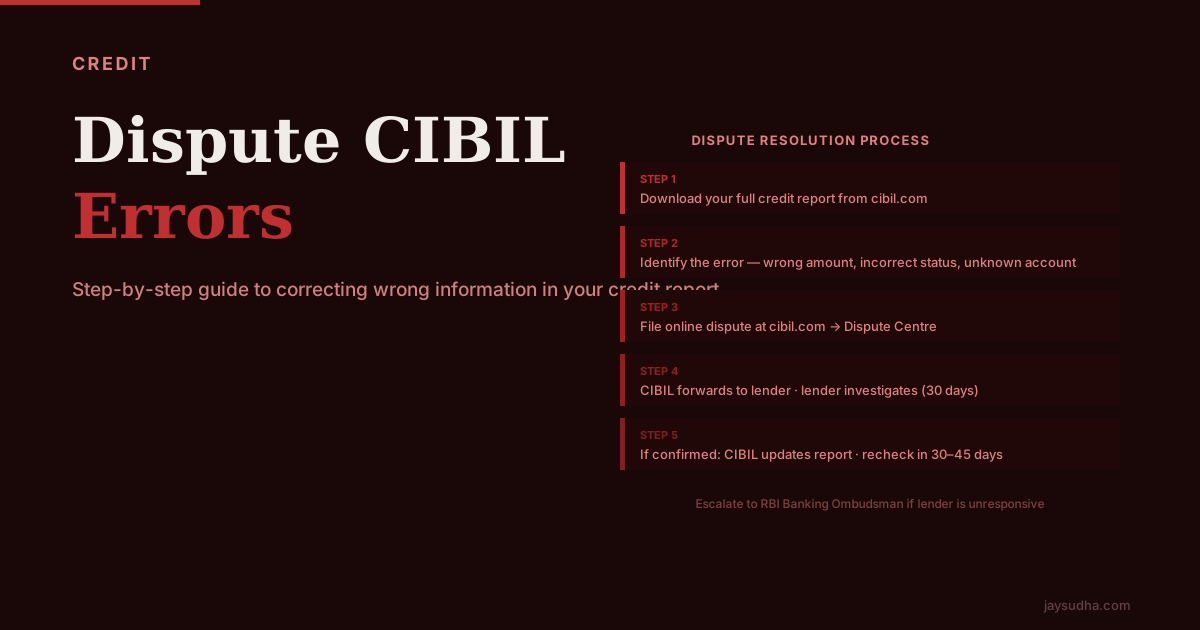
The CIBIL Dispute Process — Step by Step
| Step | Action | Where |
|---|---|---|
| 1 | Log in to your MyCIBIL account | mycibil.com |
| 2 | Navigate to the Dispute Centre | Under your credit report view |
| 3 | Identify the account with the error | From your report |
| 4 | Click "Raise a Dispute" on that account | Dispute Centre |
| 5 | Select the dispute type from the dropdown | (see options below) |
| 6 | Describe the error in the text field | Be specific |
| 7 | Upload supporting documents | JPG, PDF — keep each file under 2MB |
| 8 | Submit and note the dispute reference number | Save this |
| 9 | Track status in the Dispute Centre | Usually updates within 2–4 weeks |
Dispute types you can select:
- Personal details wrong (name, DOB, address)
- Account details wrong (balance, loan amount, status)
- Payment status wrong (late payment marked incorrectly)
- Account belongs to someone else (fraud / identity error)
- Account closed but still showing as active
- Duplicate account
Each type routes the dispute to the relevant lender with a specific category, which helps the lender's team know where to look.
What Happens After You File
Once you submit the dispute, CIBIL's process works as follows:
CIBIL sends the dispute to the lender: The credit bureau contacts the bank or NBFC that submitted the original data and asks them to investigate.
Lender investigates and responds: Under the standard process, the lender is expected to respond within 30 days. They'll check their own records against your dispute.
If the lender confirms the error: CIBIL updates the record. You'll see the correction reflected in your report, and your score may update (it won't instantly — give it one full monthly cycle).
If the lender doesn't respond within the timeline: Per standard process, the disputed information may be removed or flagged. CIBIL's own policy states that if a lender doesn't respond within 30 days, CIBIL will follow up and take appropriate action. The practical outcome depends on the specific case.
If the lender disputes your claim: The lender maintains that their record is correct. CIBIL typically keeps the original information in this case. You'll need to escalate (see below).
Track your dispute status by logging into mycibil.com → Dispute Centre → Dispute Status. You'll see where things stand. Keep your dispute reference number.
When the CIBIL Dispute Doesn't Work
Sometimes the lender disputes your dispute — they maintain their records are correct even when you believe they're wrong. Here's the escalation path:
Write to the lender directly: Send a formal written complaint (email with read receipt, or registered post) to the bank's Nodal Officer or Grievance Redressal Cell. Include your evidence, reference the CIBIL dispute number, and request confirmation that they will update their records. Keep all correspondence.
RBI Banking Ombudsman: If the lender doesn't resolve it within 30 days of your formal complaint, or if you're unsatisfied with their response, you can file a complaint at the Centralised Payment Fraud Registry and Banking Ombudsman portal (bankingombudsman.rbi.org.in). The Ombudsman can direct banks to correct errors. This is a free process and doesn't require a lawyer.
Consumer Forum: For cases where the error has caused verifiable financial harm (a loan was rejected, you paid a higher interest rate), you can approach the Consumer Disputes Redressal Forum under the Consumer Protection Act 2019. This is more involved but is a legitimate option for serious cases.
Legal notice: In cases involving fraudulent accounts or significant credit damage, a lawyer's notice to the bank often prompts faster action than all other channels combined.
The RBI Banking Ombudsman route is the most practical escalation for most people — it's free, structured, and has actual authority over banks.
Errors at Other Bureaus
The dispute process at Experian, Equifax, and CRIF High Mark follows the same general structure — log in, go to the dispute section, identify the account, select the error type, upload documents, submit. Each bureau has its own dispute centre, but the underlying process is the same because they're all working with the same lenders and the same RBI-governed reporting framework.
If you find an error on your CIBIL report, check whether the same error exists on the other bureaus. If the lender is reporting the same incorrect data to multiple bureaus, you'll need to file disputes separately at each one where the error appears — fixing it at CIBIL doesn't automatically fix it at Experian.
How Long to Monitor After a Correction
After a dispute is resolved and CIBIL confirms the correction, allow one full monthly reporting cycle (typically 30–45 days) for the change to show up in your updated report and score. Then download your report again and verify the correction appears correctly.
Don't assume it worked without checking. Sometimes the correction gets applied to one field but not another. For example, a loan might get its status changed from "Open" to "Closed" but the outstanding balance might not get zeroed out. Check all the relevant fields, not just the one you disputed.
One Practical Note
Errors on credit reports are not always the lender's fault. Some arise from data entry mistakes at the lender's side. Some arise from bureau data processing issues. Some arise from name or PAN collisions (two people with similar names and other matching details). And some are genuine fraud.
The dispute process doesn't require you to know the cause — it just requires you to identify the specific incorrect information and provide the correct version with documentation. The investigation on the other side figures out the cause.
What it does require is that you actually read your credit report and catch the error. Most people never do.
The Role of the No-Objection Certificate (NOC) in Preventing Errors
A No-Objection Certificate from a lender is the most powerful document for preventing credit report errors after loan closure. Many borrowers overlook this step.
After closing any loan (home loan, personal loan, car loan, credit card with outstanding) or upon completing the repayment, request the following from the lender:
-
NOC / No Dues Certificate: A letter on the bank's letterhead stating the loan account number, the borrower's name, and confirming that all dues are cleared and the bank has no outstanding claim on the borrower.
-
Original collateral documents (for secured loans): For home loans and LAP, the original property documents (title deed, sale deed, encumbrance certificate) pledged to the bank must be returned. Verify you receive all documents listed in the loan agreement.
-
Request for CIBIL update: Some banks update the bureau automatically within their regular monthly reporting cycle. Others update only on request. Explicitly ask the lender's operations team to update the bureau to reflect "Closed" status.
Keep the NOC permanently. If years later the account reappears on your CIBIL report or a lender claims outstanding dues, the NOC is your definitive defence.
Timeline: NOC is typically issued within 7–15 business days of the final payment. If not received, send a written reminder. For large loans (home loans), insist on receiving the original property documents — do not accept a delay of more than 30 days after final payment.
After the Dispute Is Resolved: Verifying the Correction
A common mistake is filing the dispute, receiving a closure confirmation from CIBIL, and never verifying that the correction was properly reflected in the report.
After receiving notification that your dispute is resolved:
Step 1: Wait one full reporting cycle. Credit bureau data is updated monthly. Allow 30–45 days after the dispute closure notification before pulling a new report.
Step 2: Download a fresh report. Go back to mycibil.com (or the relevant bureau's site) and pull a new credit report. Do not rely on the cached report you may see on third-party apps — pull directly from the bureau.
Step 3: Verify every affected field. If the dispute was about a closed account showing as open: verify both the status (now "Closed") and the outstanding balance (should be zero). Sometimes one field gets corrected but not the other.
Step 4: Check the score change. After a material correction (like removing a false late payment or closing an erroneously open account), the score should improve in the subsequent calculation. If it hasn't, there may be another issue in the report still dragging it down.
Step 5: Check the same error at other bureaus. If the error existed at CIBIL, it may exist at Experian, Equifax, or CRIF as well. Fix it at all bureaus where it appears.
Frequently Asked Questions
Sources and references
Rules, rates, and thresholds in India change over time. Always confirm the current position with the official source above before acting on it.